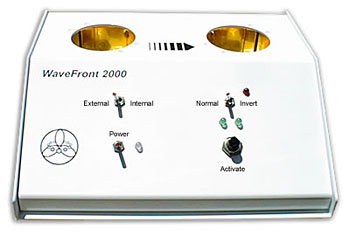
User
Instructions:
The WaveFront 2000 is a
Signal Transference Technology device. It is capable of transferring the
"Energetic Signal or Signature" (the unique Energetic information pattern) of a
substance or remedy to a receiver solution. The WaveFront 2000 may be used
to:
- "Duplicate" Homeopathic
Remedies,
- "Invert" substances into
homeopathic-like remedies,
- "Imprint"-Remedies using the
Avatar Testing System.
WaveFront 2000 usage is
very simple. The following instructions will guide you through the basic setup
and operational procedures of the WaveFront 2000.
Definitions:
Energetic-Signal: Every substance and every remedy
has a unique energetic pattern or frequency. This pattern is informational in
nature.
Signal Transference: A process that uses
electro-magnetic fields and carrier-waves to transfer the Energetic-Signal of a
substance or remedy to a Receiver-Solution
Inverting: An advanced process that inverts the
Energetic-Signal of a substance; 180 degrees into a homeopathic-like remedy
signal. With this technology you can create a custom energetic-remedy for each
patient in just a few seconds with little effort.
- This process based on the
research of Dr. Wolfgang Ludwig, works with any substance.
- The material can be any type of
raw material that you wish to invert into a homeopathic-like
remedy.
- o Allergic Substances, animal
hair, pollen, foods, dust, molds… o Body fluids, blood, urine, tears,
sputum…
- o Infected tissue or necrotic
matter,
- o Extracted dental materials.
Receiver-Solution: A Receiver-Solution is used as a
carrier for the information transferred from the remedy or substance. Typically
water-based solutions offer the best results. This includes water-based
remedies, for example low potency homeopathic remedies, liquid herbal drainage
remedies, structured water products, etc…
Input/Output-Wells: The WaveFront 2000 uses two
gold-plated, Electro-Magnetically charged receptacles for the transference
process. Each well offers dual electro-magnetic fields and dual amplifier
circuits. This unique electronics design automatically filters out and
eliminates undesirable "Electro-Smoke". Electro-Smoke is unavoidable, unwanted,
garbage, electro-magnetic information from the environment that inherently is
added to the Signal-Transference.
Imprinted Remedies: The WaveFront 2000 will
interface with Avatar software offering the ability to create "Imprinted
Remedies". Imprinting is an esoteric technique using "Soft or Fuzzy" scientific
principals known as "Radionics" or "Psychotronics". The WaveFront 2000 is an
excellent platform for Imprinting due to its Electro-Magnetic Field
capabilities, which add to the Imprinting process.
Features and Controls
Front Panel Features:
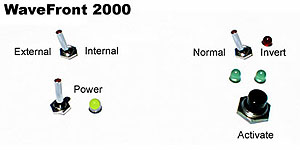
Power On/Off Switch
with Power On Indicator LED: The power light glows green if the batteries
are in good condition. It will glow red if the battery power falls too low for
proper operation. The power-low red indication will only display while the
green LED's are flashing during an imprinting or duplicating sequence.
External - Internal
Switch: This switch controls the source of information.
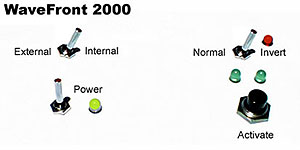
- The "External" switch
position is used only when you are "Imprinting" from Avatar
Software.
- The "Internal" switch
position is used when you are "Duplicating" or "Inverting".
Normal - Invert
Switch
- This switch is functional only
when you are using the "Internal" switch position.
- Use the "Normal" switch
position when want to "Duplicate" a homeopathic remedy.
- Use the "Invert" switch
position when you want to create an "Inverted" remedy.
Activate
Button
- Use the "Activate" button to
initiate the "Duplicating" or "Inverting" sequence.
- When you are "Imprinting" the
activation sequence is automatically initiated by Avatar software.
Top-Surface Features:
Input-Well:
- The Input-Well is located
on the left side of the top surface of the WaveFront 2000,
- The Input-Well will
accommodate most standard sized remedy bottles (1 to 4 ounce),
- You may also use other
input carriers and containers, for example plastic sandwich bags, paper cups or
glass test-slides,
|
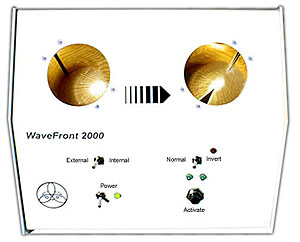 |
- Notice that the
Input-Well is gold plated providing a superior interface with no contamination
to the source information as it is transferred to the right side
Output-Well,
- Source
materials, homeopathic remedies and substances are always inserted into the
Input-Well, never the Output-Well.
Output-Well:
- · The Input-Well
is located on the right side of the top surface of the WaveFront
2000,
- The Output-Well will
accommodate most standard sized remedy bottles (1 to 4 ounce).
- It is recommended that
you use a professionally manufactured, liquid-based remedy as the receiver
solution. Water-based herbal-homeopathic drainage remedies, or low potency
homeopathic remedies are excellent solutions. Using a bottled filled with water
and alcohol is effective, however this conflicts with FDA manufacturing laws.
Selling or even giving a patient a bottle that you have filled with any
solution is considered a Federal Felony offense, "manufacturing without a
license".
|
Rear
Panel Features:
Battery
Compartment:
- The Battery Compartment
requires four (4) AA type batteries.
- Battery Life can be
expected to last for several weeks even when the device is used
repeatedly.
- We recommend that you use
standard AA Alkaline type batteries and not rechargeable NiCad type
batteries.
- Also it is advisable
that you do not mix used and new batteries.
|
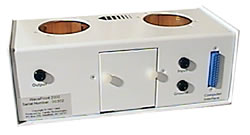 |
Input
Socket:
- · Accommodates an external
input source, for example a Test Vial Honeycomb.
- The Input is wired directly to
the left side Input-Well.
- Use a standard Banana-type cable
(2 banana cables are included with your WaveFront, Yellow and Black) to hookup
external honeycombs.
- External sources are not
preferred to using the left side
Output
Socket:
- Accommodates interfacing the
WaveFront 2000 with external Electro-Magnetic Field Therapy devices like the
Medisend Super.
- Use a standard Banana-type cable
(2 banana cables are included with your WaveFront, Yellow and Black) to hookup
external devices.
Ground:
- May be used to "Ground" a patient
to the unit.
- Patient Grounding adds the
Patient's Energetic Pattern to the transference sequence·
- Use a standard brass
Ground-Electrode connected to the WaveFront 2000 with a standard Banana-type
cable (supplied with WaveFront 2000).
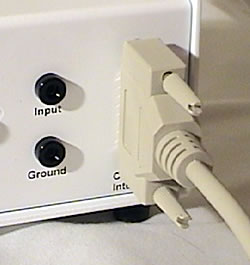
Parallel Computer Interface:
- Used to interface the WaveFront
2000 with a standard PC computer and Avatar software.
- Connects the WaveFront 2000 to
the computer's parallel (printer) socket
- Parallel interface cable
supplied with WaveFront 2000
WaveFront 2000 Setup:
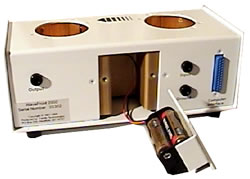
- Remove the two
thumbscrews on the back of the WaveFront 2000 to open the battery compartment.
- Gently pull out the
battery holder and insert 4 new AA batteries.
- Replace the battery
holder and hand-tighten the battery compartment thumbscrews. Do not use a
wrench or pliers to over-tighten the screws.
- Turn the Power On/Off
switch "On" The indicator light will verify that the batteries are installed
correctly.
|
 |
WaveFront 2000 Operation:
Duplicating Homeopathic Remedies:
- Put a homeopathic remedy
in the left-hand Input-Well,
- It is advised that you
use homeopathic remedies at 12X or higher potency,
- The WaveFront 2000 will
not duplicate actual matter, for example a nutritional supplement or an herbal
remedy,
- The remedy can be a test
vial or a full-sized remedy bottle,
|
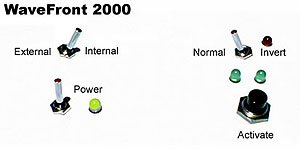
- Set the External/Internal
Switch to INTERNAL,
- Set the Normal/Invert
Switch to NORMAL,
- Place the receiver
solution in the Output-Well,
|
 |
- Turn power ON. You will
hear a tone indicating the unit is operating properly,
- Press the ACTIVATE
pushbutton to start the timer,
- The green LED's above the
Activate-Button will flash while the WaveFront is duplicating,
- The process takes several
seconds to complete,
- When the LED's stop
flashing, a short tone will sound indicating the duplicating sequence is
complete,
- When the LED's stop
flashing, turn OFF the power switch.
- Sarccusch the final
solution 10 times (pound the bottle against your palm as you would if you were
making a homeopathic remedy). This guarantees a stronger imprint into the
structure of the Receiver-Solution.
|
Creating Inverted Remedies:
- Put a substance in the
left-hand Input-Well,
- Use a container or some
other media to keep the material from contaminating the Input-Well,
|
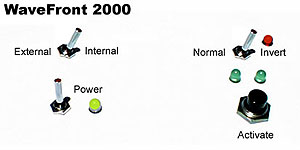
- Set the External/Internal
Switch to INTERNAL,
- Set the Normal/Invert
Switch to INVERT,
- An LED located to the
right of the Normal/Invert switch verifies that the Invert mode has been
activated.
|
 |
- Place the
Receiver-Solution in the Output-Well,
- Turn power ON. You will
hear a tone indicating the unit is operating properly,
- Press the ACTIVATE
pushbutton to start the timer,
- The green LED's above the
Activate-Button will flash while the WaveFront is duplicating,
- The process takes several
seconds to complete,
- When the LED's stop
flashing, a short tone will sound indicating the duplicating sequence is
complete,
- When the LED's stop
flashing, turn OFF the power switch.
- Succuss the final
solution 10 times (pound the bottle against your palm as you would if you were
making a homeopathic remedy). This guarantees a stronger imprint into the
structure of the Receiver-Solution.
|
Imprinting Remedies:
- Connect the WaveFront
2000 to your computer using the parallel cable (supplied with WaveFront 2000).
You will need to disconnect your printer from the parallel port (printer port)
temporarily to use the WaveFront,
- Connect the other end of
the parallel cable to the WaveFront 2000,
- Remove any substances or
remedies from the Input-Well,
|
 |
- Set the External/Internal
Switch to External,
- Set the Normal/Invert
Switch to Normal,
- Place the
Receiver-Solution in the Output-Well,
- Turn power ON. You will
hear a tone indicating the unit is operating properly,
|
 |
- Go to your computer and
open Avatar software,
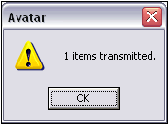
- Select the Item(s) that
you wish to Imprint and use the "Transmit Items" options to activate the
Imprinting process. Refer to your Avatar User's Guide or on-line help system
for specific instructions.
- Avatar software will
automatically activate the WaveFront 2000,
- When the LED's stop
flashing, a short tone will sound indicating the duplicating sequence is
complete,
|

- When the LED's stop flashing,
turn OFF the power switch.
- Succuss the final solution 10
times (pound the bottle against your palm as you would if you were making a
homeopathic remedy). This guarantees a stronger imprint into the structure of
the Receiver-Solution.
Care
and Cleaning the WaveFront 2000:
- Use isopropyl alcohol or water
and mild soap with paper-towels to clean the surface of the WaveFront
2000,
- Use alcohol and tissue-paper to
clean the Input/Output-Wells to avoid scratching the gold-plated surface of the
wells,
- Replace the batteries after an
extended period to avoid leakage of battery acid,
- For additional technical support,
contact VeraDyne Corporation (702) 914-7901, info@veradyne.com.
© VeraDyne Corporation - All rights reserved
|